Harness Engineering: Why the Frame Matters More Than the Model
It took me three iterations to implement a straightforward feature across two repositories. Not because the model was inadequate — same model, same task. The

In the previous posts in this series, we looked at setting up a Mac Mini M4 with Ollama behind a Headscale VPN as a local LLM endpoint and OpenCode as a CLI coding agent with multiple providers.
This post puts the pieces together - not as a blueprint, but as a proof-of-concept evaluation: we built and tested this combination at Infralovers to find out where the limits are and which use cases it's actually suited for. Spoiler: it works well as a starting point, less so once your team grows or agentic coding becomes a heavy daily workflow.
One key insight upfront: we don't run everything locally. OpenCode is configured with two providers - the local Ollama endpoint for everyday work and Anthropic's API for tasks that require deeper reasoning. That hybrid approach is the core of the setup.
Here's what we built and tested:
The Mac Mini is our test device for exactly this question: what's actually possible with a small, affordable Apple Silicon machine - and is the investment worth it?
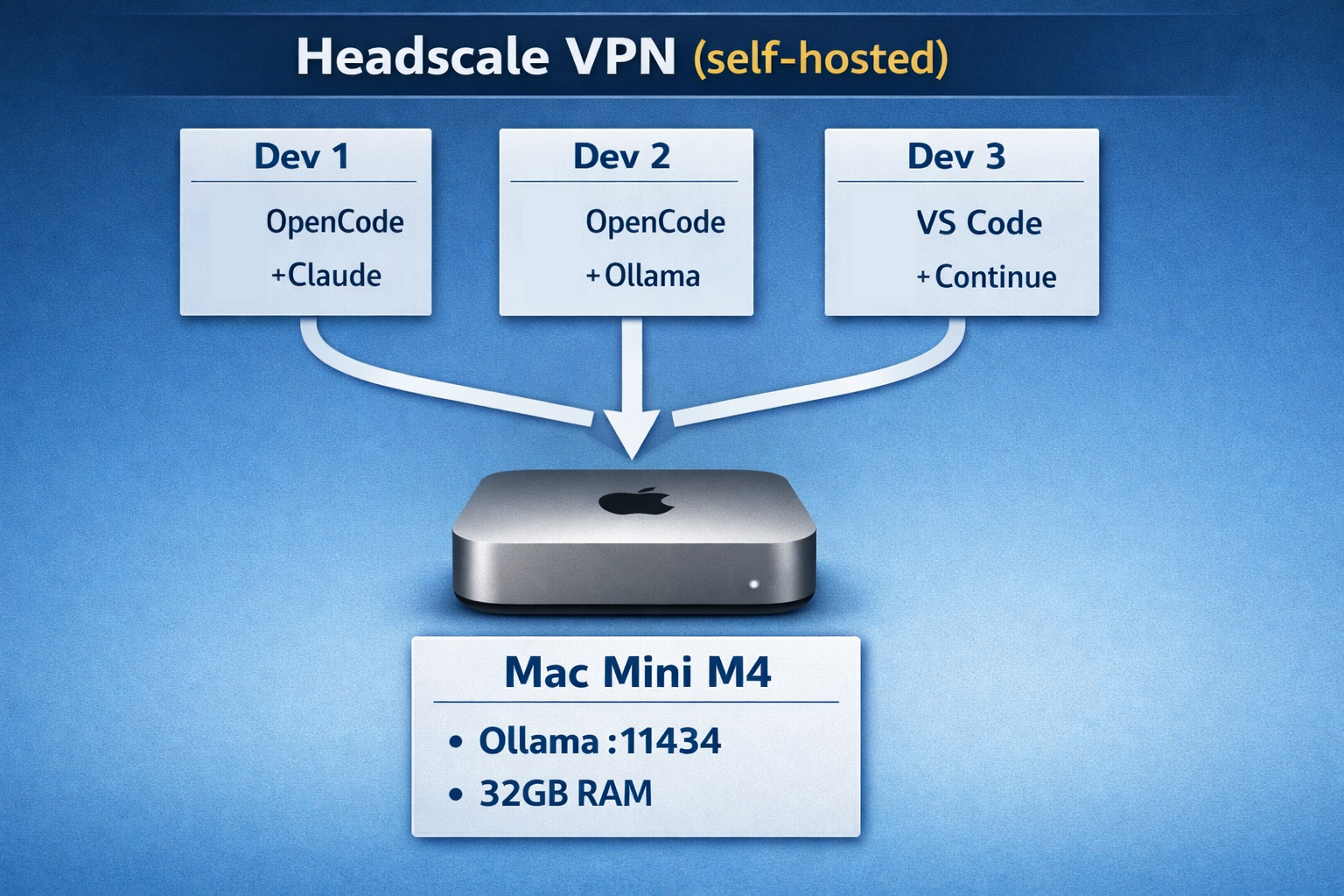
Each developer can choose their own client tool. OpenCode, VS Code with Continue, JetBrains with AI plugins, or even curl - it doesn't matter. The Ollama endpoint speaks the OpenAI API format, so anything that can talk to OpenAI can talk to our Mac Mini.
The Mac Mini runs Ollama with OLLAMA_HOST=0.0.0.0 and is connected to our Headscale VPN. Its Tailscale IP is stable (e.g., 100.64.0.10), so it is always reachable. Alternatively, Tailscale offers DNS and lets you use a hostname like mac-mini.your-tailnet.ts.net instead of a fixed IP.
On each developer's machine, we create a file called ~/.config/opencode/opencode.json:
 1{
 2  "$schema": "https://opencode.ai/config.json",
 3  "provider": {
 4    "company-ollama": {
 5      "npm": "@ai-sdk/openai-compatible",
 6      "name": "Infralovers LLM",
 7      "options": {
 8        "baseURL": "http://100.64.0.10:11434/v1"
 9      },
10      "models": {
11        "qwen3-coder:30b": {
12          "name": "Qwen3 Coder 30B (Company)"
13        },
14        "llama3.1:8b": {
15          "name": "Llama 3.1 8B (Company)"
16        }
17      }
18    },
19    "anthropic": {
20      "name": "Anthropic",
21      "models": {
22        "claude-sonnet-4-5-20250929": {
23          "name": "Claude 4.5 Sonnet"
24        }
25      }
26    }
27  }
28}
Notice: we define two providers in the same config. The company Ollama endpoint for daily work, and Anthropic's API for when we need frontier-model reasoning. Developers switch between them with /models in OpenCode.
All you need to get started, is a successful connection through your Tailscale client. Run tailscale status to check connectivity, then start OpenCode and select the company model:
 1# Make sure you're connected to the tailnet
 2tailscale status
 3
 4# Test the Ollama endpoint
 5curl http://100.64.0.10:11434/v1/models | jq
 6
 7# Start OpenCode and select the company model
 8opencode
 9> /models company-ollama/qwen3-coder:30b
10> Hello, can you see my project?
That's the baseline. No complex setup, no API keys for the local endpoint, no billing configuration. Connect to the VPN, start coding - and see where it works and where the limits show up.
We don't use local models for everything - and testing quickly showed that wouldn't make sense anyway. As a rough working framework, we've been distinguishing where local inference holds up and where it runs into limits. This is a working hypothesis, not a measured split:
How the work actually splits depends heavily on the developer, the task, and the models in use. We don't have reliable measurements yet - this is the state of our ongoing evaluation. What we have concretely observed: when 3+ developers hit the same 14B model simultaneously, response times increase noticeably. With 32GB RAM, the headroom for parallel inference with larger models is limited.
The beauty of running an OpenAI-compatible endpoint is that it's not limited to OpenCode. Here's what else we (and you) can connect:
Continue is an open-source AI code assistant that runs as an IDE extension. We can also point it at the Ollama endpoint:
1{
2  "models": [{
3    "title": "Company LLM",
4    "provider": "ollama",
5    "model": "qwen3-coder:30b",
6    "apiBase": "http://100.64.0.10:11434"
7  }]
8}
n8n can use the Ollama endpoint for AI-powered workflows: automated code review, documentation generation, ticket summarization, and more. The AI Agent node connects to any OpenAI-compatible endpoint.
Any script using the OpenAI Python or JavaScript SDK works by changing the base URL:
 1from openai import OpenAI
 2
 3client = OpenAI(
 4    base_url="http://100.64.0.10:11434/v1",
 5    api_key="not-needed"  # Ollama doesn't require a key
 6)
 7
 8response = client.chat.completions.create(
 9    model="qwen3-coder:30b",
10    messages=[{"role": "user", "content": "Review this code: ..."}]
11)
With MCP support in both OpenCode and other tools, you can extend the AI's capabilities with custom tools - database access, internal APIs, documentation search - all routed through your private endpoint.
After running this setup for several months, here's what we've learned:
ollama pull qwen3-coder:14b weekly.Local inference has real limits. We reach for cloud APIs when:
The strength of this setup isn't that local replaces cloud. It's that local handles the volume, and cloud handles the complexity.
Building a stack like this doesn't require a server room, a dedicated ops team, or a six-figure budget. For a proof of concept or a small team, the bar to entry is genuinely low. Here's what we found:
That said: if your team scales up, or agentic coding (longer autonomous runs, parallel agents, large context tasks) becomes a central part of your workflow, you'll outgrow a single Mac Mini fairly quickly. At that point, the conversation shifts - either toward more capable local hardware, or toward cloud APIs as the primary inference layer.
This setup works for us at Infralovers - but we also continuously evaluate frontier approaches for ourselves and our clients. Claude Code, Codex CLI, Bob, and others. Not because local isn't good enough, but because every team has individual requirements and preferences. What works well for one team may not be an option for another - an existing vendor relationship, compliance constraints, or simply different priorities. That variety is normal, and it's exactly why knowing multiple options is worth the effort.
Deploy Open Code with self-hosting options, MCP integration, and full data sovereignty.
Leverage AI tools to enhance coding efficiency, automate repetitive tasks, and unlock innovative development workflows.
Transform your engineering workflows with hands-on AI: Deploy LLMs, automate infrastructure, and master the latest tools and protocols.
It took me three iterations to implement a straightforward feature across two repositories. Not because the model was inadequate — same model, same task. The
Securing Your Self-Hosted Automation: A Deep Dive into n8n and Vault/OpenBao Integration In the rapidly evolving landscape of workflow automation, self-hosting
Workflow automation used to be simple. Trigger fires, steps execute, data moves from A to B. Every branch is predetermined. Every outcome is scripted. The human
Learning & Development is a Satisfaction Driver—and a Competitive Advantage In many organizations, learning and development is still treated as a
In the late 1960s, Melvin Conway submits a paper on computer manufacturers and compiler design to the Harvard Business Review. They reject it -- insufficient
You are interested in our courses or you simply have a question that needs answering? You can contact us at anytime! We will do our best to answer all your questions.
Contact us