AI First Has a True Core. Usually It Is Not the AI
Picture the leadership team declaring AI First. Every department is told to go through its processes and mark where a model can help. A few weeks later a list

A few weeks ago, a policy block from a slide in one of our channel partner's courses ran against a Vault in a container. vault policy write rejected it with At 2:35: illegal char, and nothing was created. A second block, this time for transit/keys/*, failed with invalid capability "create”, ”update". In both cases the slide had typographic curly quotes where plain straight ones belong. The corrected version of the first block ran through.
The interesting part is less the bug than the fact that we could find it automatically. On a PowerPoint slide, code is text in a text box, and nothing in the format makes sure anyone ever runs it. In a Markdown deck the same code is a code block, and a code block can be extracted and executed as a real call.
That is one reason we don't build slides in PowerPoint or Keynote. Our training slides have been Markdown for more than ten years, and MARP, the tool that renders them, is replaceable. Later came carousels for LinkedIn and sharepics for websites and social media, which we also moved to MARP after a detour through a PPTX generator, and most recently short learning videos.
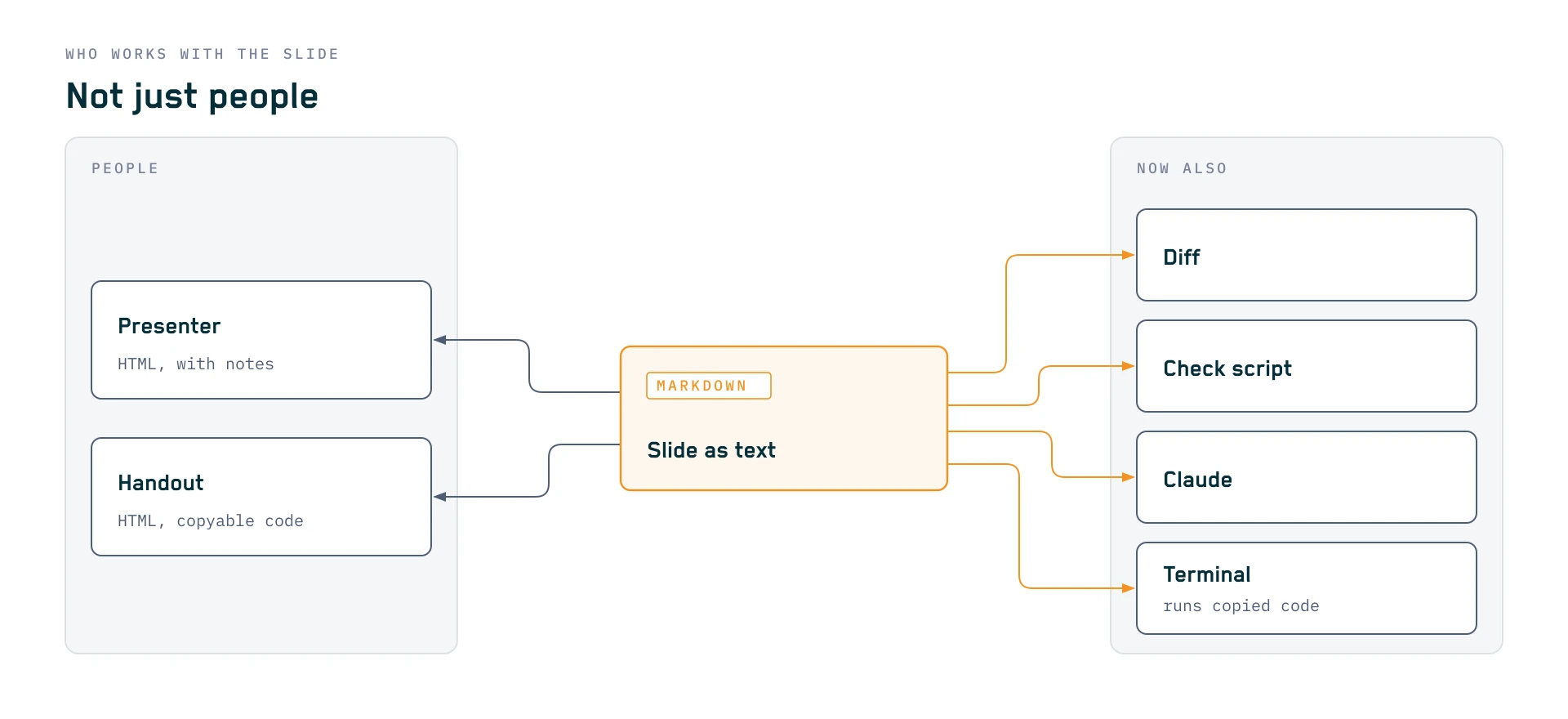
PowerPoint can do plenty of this too: click reveals, presenter view, slide masters, hand-drawn diagrams. But it has no advantage left that we still need. The difference shows once people are no longer the only ones working with a slide. Then the slide has to exist as text: in the diff, when checking and running code, in tooling and per-slide review, and when copying with indentation intact. The point-by-point comparison comes further down. First, the three stations where we made it.
For the first years we wrote our slides in Deckset, a popular Mac app at the time that also renders Markdown. At some point we wanted more control over rendering than a finished app gives you, and moved to MARP. Other tools would have worked as well. The switch is still visible in the Git history of what is now our training monorepo for all courses, which starts in June 2021 with "added Infralovers marp theme". Shortly after, the container slides arrived raw, with Deckset header lines like theme: Business Class and autoscale: true, and the next commit reads "moved container-essentials here and marped it". The header, the image syntax and a few control comments changed; the slide text stayed Markdown. Today slidedecks/ holds 356 MARP decks in 46 course folders. Our theme infralovers.scss is 321 lines.
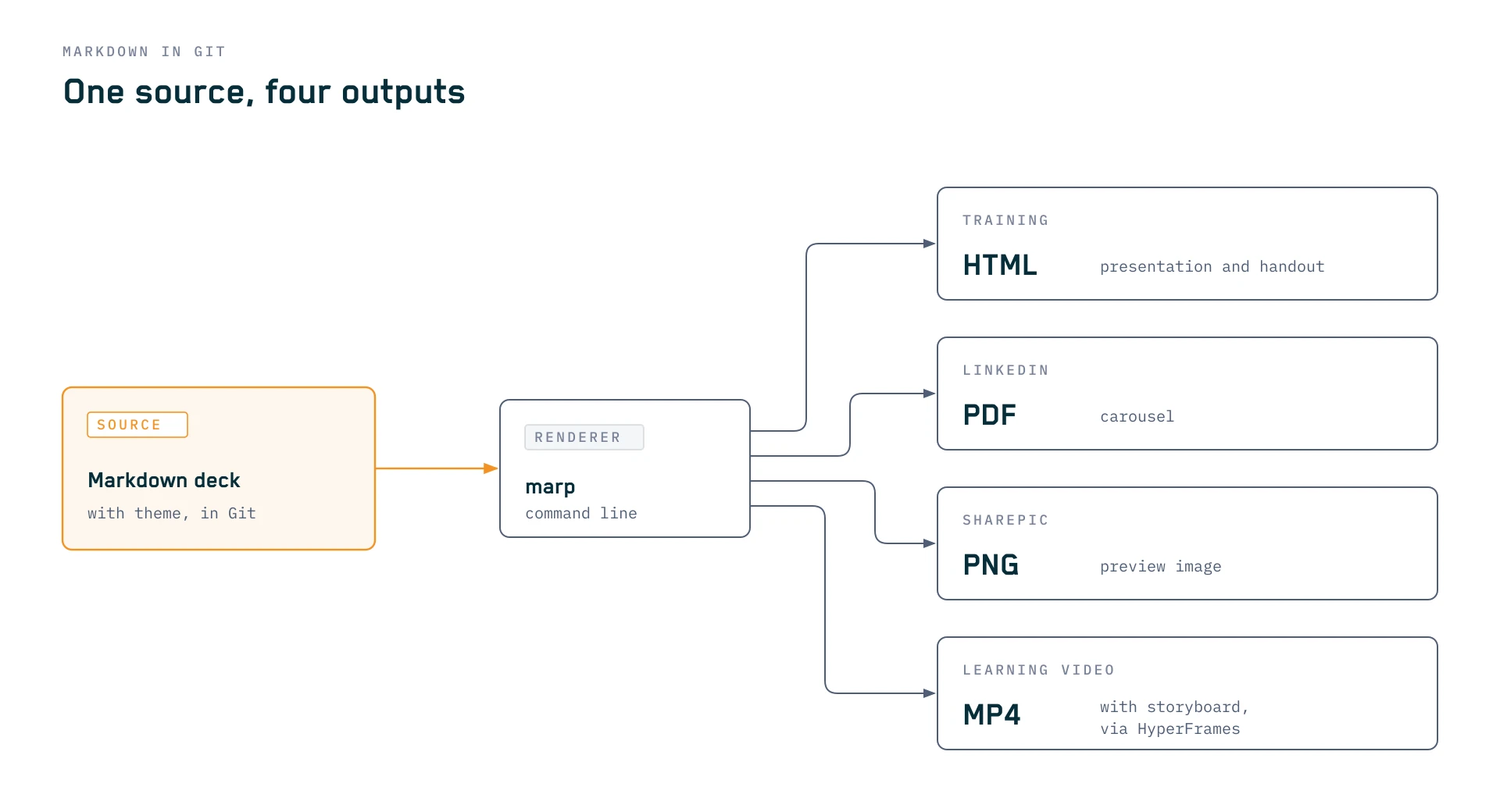
MARP turns Markdown into slides. The deck is a Markdown file, the theme a CSS file with colors, fonts and slide formats, and the command-line tool marp produces HTML, PDF or PNG from them. A line with three dashes separates slides, and a comment above a slide picks its type. It reads like prose and can be compared, reviewed and merged line by line in Git.
For trainings we run regularly and keep updating, that is more than a matter of taste. A mistake in a command is fixed as a line change and is visible to everyone in the pull request.
In the repo the command is now fixed. For participants it arrives through the output format, and that can have side effects. We have always offered our slides as a PDF download too, and now and then subtle problems appeared when participants did not type code blocks themselves but copied them from the PDF. We went after this, because code shows the difference best, especially in languages where whitespace has meaning. During one of the last training runs we did a small test. From our Behave course (BDD with Python) we took two blocks as they appear on the slides: the lint and test jobs from the GitLab CI file and a step definition in Python. We put both into a MARP deck and rendered it to PDF.
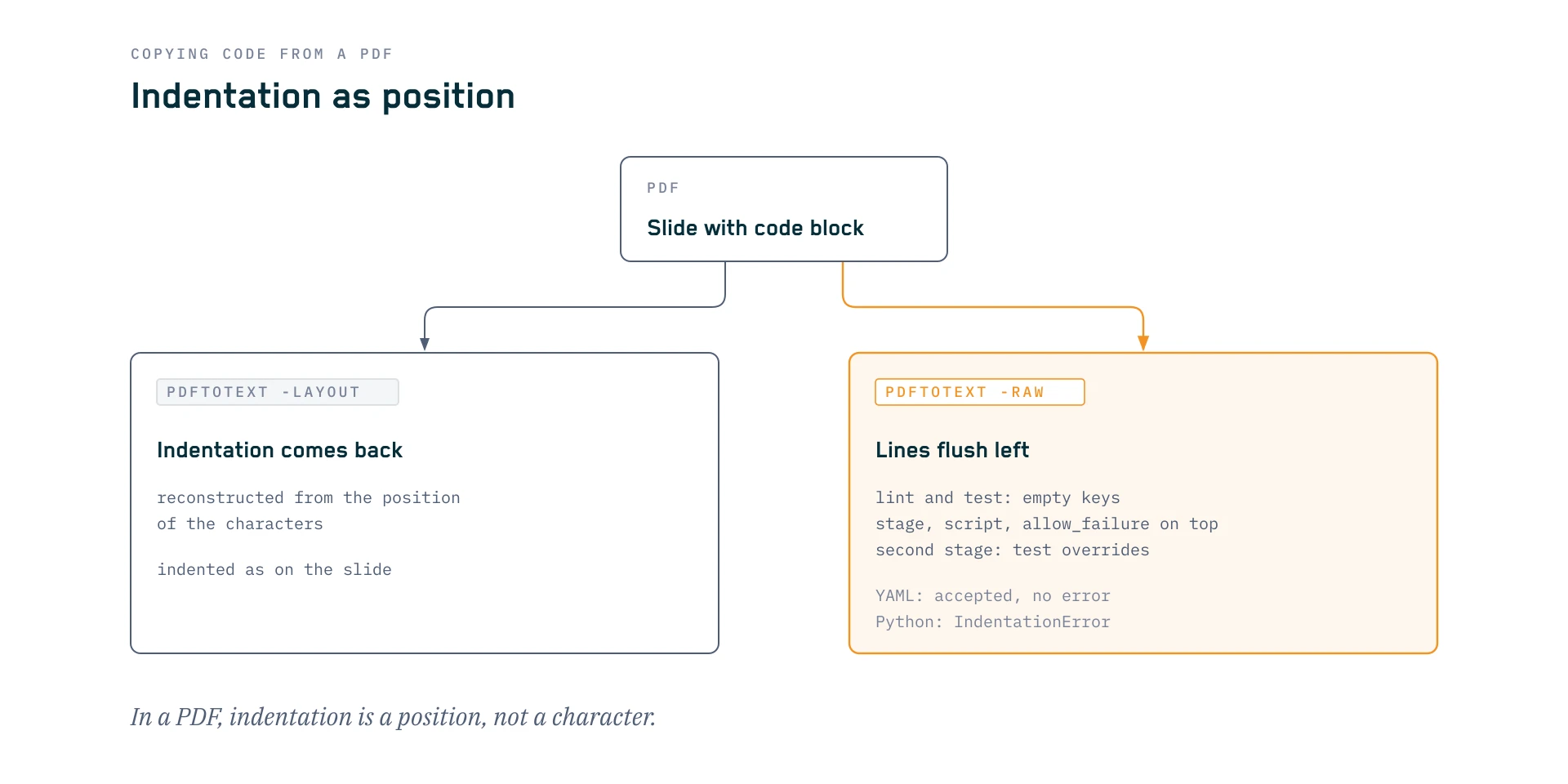
With pdftotext -layout the indentation comes back, because the tool reconstructs it from the position of the characters. With pdftotext -raw the same lines sit flush at the left margin. In the PDF, indentation exists as a position, not as characters, and whether it survives copying depends on the tool doing the copying. The same goes for any tool that outputs the characters without recomputing their position. -raw is one of them.
The text from the -raw run shows what that can mean. The YAML is still valid YAML afterwards, just a different one: lint and test are empty keys, stage, script and allow_failure sit at the top level, and the second stage: test overwrites the first. A YAML parser accepts that without a complaint. Python at least speaks up and stops with an IndentationError, because the body of the step function is no longer indented. If code lands in the participants' terminal or editor like this, the YAML can break without anyone noticing.
In HTML, the code block is text with real spaces: participants can select it, copy it and run it, and a script can pull it out of the deck without reading an image. Text can be extracted from a PPTX as well, and we did that when we converted the partner's course. So the Vault run from the beginning does not prove the extraction. It proves what comes after: running the code and putting the output back on the slide in a verifiable way.
For training, the PDF finding settles the format. MARP renders HTML, and for trainings that is no by-product. The presentation runs in the browser, with arrow keys and click reveals. The p key opens presenter view with the notes. On top comes a self-contained HTML handout that participants open in the browser; a button on every code block copies the code with its indentation, which removes the detour through the PDF.
A PDF cannot do reveals, it shows every slide in its final state. For carousels that is exactly right, for a training less so: a reveal that builds up step by step what happens on the slide is no decoration there. We only ship the PDF as a fallback now.
Because the slides are only text with a bit of markup, tools can sit on top of them. For a few months a cockpit has been running over our training repo, a web interface that keeps growing. It shows courses, decks, labs, lab code, open reviews, branches and pull requests, and we store recurring tasks in it as code. One example is a review view that places an older state, say the previous version of a training, next to the new version slide by slide, with a column for findings each. That works because every slide can be addressed as text; matching old slides to new ones remains a task of its own for the tool. With that we can develop the slides with our own checking tools and with Claude, for instance by working new research results from our knowledge wiki into a deck, or by bringing a deck up to date with a tool's current docs. We run the code on the slides for real while doing this, directly in the training environments, and the outputs of those runs go into the slides. The knowledge wiki is an LLM wiki in the pattern Andrej Karpathy described: sources go in, a language model maintains linked pages from them, and with us every statement stays traceable to its source. How we run it is a topic for a separate post.
This shows best on slides we did not write ourselves. Part of our trainings comes from the partner, as PowerPoint plus a PDF handout for participants, and we may not change these slides directly. What we can deliver is feedback, and for that our review tool has to work with the decks. When we received the decks of one course as PPTX, we converted them to MARP: slide images from the PDF handout, text and notes from the PPTX. The conversion had three parts:
On top there is a small plugin for line highlighting in terminal blocks as in the original (```shell {2}). So the partner's slide master can be rebuilt as a theme. A slide master, the argument goes, simply lives in PowerPoint. From PPTX to MARP that no longer holds. Going back to PPTX works too, more on that below. The drafts from the script needed manual work afterwards. Anyone who has designed a web page can read a MARP theme, because a master layout becomes a class with dimensions and colors. Reading is easy; transferring the master was still work.
With the theme in place, we could set up the review. We ran the code blocks of all the course's decks and labs against Vault 2.2.1, the run from the beginning was one of them, and whatever could not be reproduced we marked in the trainer notes with VERIFY:. A three-day delivery followed, in which questions from the room and our own stumbling points as trainers often went into the decks the same day.
We handed the result back to the partner as a proposal: 614 slides in 28 decks, 104 of them new. Around 550 findings led to a change, 200 of them updates to Vault 2.2.1. For the lab scripts we proposed 31 fixes, including check scripts that check nothing and a policy that grants the wrong path. 25 outputs could not be reproduced without an Enterprise license or real cloud accounts; they are marked VERIFY: so trainers know what still needs a real run. We delivered every deck as two self-contained HTML files: one for trainers with notes and presenter view, one for participants as a handout without notes. The partner has since worked the proposal in and is evaluating it until the end of the year. That includes the process we proposed: slides as Markdown in Git, tooling on top, and delivery as HTML. Whether it would switch to it will be decided after that.
From the trainings, the approach spread to things that have little to do with code. For carousels and sharepics, PowerPoint was too heavy for us and had no advantage. A carousel is a PDF of portrait cards that people swipe through on LinkedIn as a document. A sharepic is a 1200 by 628 pixel image that hangs as a preview on a blog post or LinkedIn post. Both follow a fixed pattern, and for the sharepic only the text changes.
Since this summer we have rendered carousels from MARP. Before that, a generator built PPTX files, which we retired because a binary format cannot be compared meaningfully in Git. Today our content repo holds the source decks of all sharepics and carousels, in German and English, each with the rendered result next to it.
For the carousel, a Claude agent handles the text: it reads the theme's conventions, assigns a diagram to each insight from the blog post, and writes the cards. The diagrams don't have to be redrawn, because the same SVG files travel over from the blog post. A script renders the deck, and the agent then looks at the cards as images. It wrote the Markdown itself and would otherwise see what it expects, not what is there. The sharepic is produced by a script alone: title, subtitle and topic go in, a PNG and a source deck come out.
We render and check sharepics programmatically as well. A sharepic is not a one-off that someone builds by hand in PowerPoint, and it needs no graphics tool of its own: it is the same mechanism as with the training slides. We design the layout once as a theme, after that every image is text, and the same tools we use for code render and check it. After rendering, a script verifies the pixel dimensions, for example, because a theme that is not registered produces an image that looks right and still has the wrong format.
The same text source also produces learning videos, and this is no experiment anymore: it is how we now build real learning videos, for ourselves and in customer projects. A video is a storyboard in YAML. Every shot points to a slide from the MARP deck, a diagram from the article or a recording, and every substantive statement names its source. The diagrams build up step by step because their elements have stable IDs that the storyboard reveals in order. A synthetic voice is optional; real recordings can be transcribed locally and cut into takes. We are extending this right now: commands that actually run in the terminal and are recorded while they do, and click paths through web interfaces that Playwright captures.
Rendering is done with HyperFrames, an open-source framework from HeyGen that renders HTML and CSS deterministically and frame-accurately to MP4, locally and without an account.1 Because MARP and HyperFrames both speak HTML, the video is one more render step from files in Git, not an editing project. A mistake on a slide is fixed in the Markdown and re-rendered, just like the command in training. The checks run before the render, and afterwards the same run produces subtitles, transcript and chapters.
That is also how we showed it to the partner, as a slide in a feature tour. Click reveals, diagrams built step by step, presenter view and notes, hand-drawn diagrams, page templates, tables and PDF export with links exist on both sides. Where the paths differ, text slides come out ahead, and every time because the slide exists as text:
| Feature | Why text slides are ahead here |
|---|---|
| Framed command lines | A drawn frame does not follow the line when the code changes |
| Several runs in one block | One frame per run |
| Diagram from source | PowerPoint has no Mermaid source, only add-ins or pasted images |
| Copying code from the handout | A PDF holds line positions, not indentation; the HTML copies real text |
VERIFY: count before delivery | Notes exist in PowerPoint, a check across them needs a script of its own |
| Change as a diff | The .pptx is binary in Git, comparison happens file against file |
| Review next to the partner's slide | Comments exist, a generated review per slide does not |
Anyone who likes working in PowerPoint can keep doing so, and anyone who needs a PPTX gets one from the same source: MARP exports it, by default as slide images, editable through an experimental option. We don't need PowerPoint for our slides anymore, and anyone who works with slides the way we do probably doesn't need it either.
When the slide is only shown, both paths come out even. That changes once the slide is processed further. A PowerPoint slide is built for humans: for the presentation and the handout. By now, though, it is no longer only humans who work with it: a diff, a check script, Claude and the participants' terminal that runs the copied code. For all of them what matters is whether the slide exists as text. This is the question we would ask before choosing the format: who or what processes the slide besides the audience?
From text sources, a script then renders whichever format is needed: HTML in training, PDF or PNG on LinkedIn, MP4 in the learning video, there from deck and storyboard together. Scott S Nelson, in "Markup is the New Markdown", takes up Thariq Shihipar's thesis "HTML is the new markdown".2 Splitting by editing versus delivering is our own sharpening: what humans and agents work on is Markdown, what we deliver is HTML or something that is produced from HTML.
Open for us is how far this reaches beyond trainings. Our decks are built short and have code and commands at their core; for a talk full of diagrams that someone drew by hand in PowerPoint, the calculation would come out differently.
If participants in your sessions copy or run code from slides, the same question applies as for us: does the code arrive the way it stands on the slide? We have been working on this for years and like to exchange notes with others who run trainings or workshops. How we build such workflows with teams is described at the Enablement Team at Infralovers.
The draft was written with Claude and went through several review passes in fresh context, one each for facts, rules and argument. The figures on the training repo, theme, content repo and partner conversion come from our repos, the review figures from our release description to the partner; we ran the Vault test against a local container, and the PDF test with blocks from our Behave course, marp, pdftotext and a YAML and Python parser. The comparison table comes from our feature tour for the partner, the video section was checked against the workflow in the content repo and the HyperFrames description, and the HTML versus Markdown discussion goes back to Nelson's post. The workflow behind this is described in AI-Assisted Knowledge Work: How I Am Rebuilding My Research and Writing Process.
HeyGen (n.d.). HyperFrames. Open-source framework, Apache 2.0 license, tagline "Write HTML. Render video. Built for agents". github.com/heygen-com/hyperframes ↩︎
Nelson, S. S. (2026-05-12). Markup is the New Markdown. theitsolutionist.com. Nelson takes up Thariq Shihipar's thesis "HTML is the new markdown". Splitting by editing versus delivering is our sharpening, not a verbatim statement of the source. ↩︎
Picture the leadership team declaring AI First. Every department is told to go through its processes and mark where a model can help. A few weeks later a list
A few weeks ago, a policy block from a slide in one of our channel partner's courses ran against a Vault in a container. vault policy write rejected it with At
What does a driverless elevator have to do with the question of who still gets to become a senior in the age of AI? The first driverless elevator ran around
I wanted to find out whether our internal, VPN-only systems could be made usable from Claude, with real identity, and without the connection turning into a
Two weeks ago I wrote about what changes when you keep the model fixed and swap the harness. The short version: the wrapper matters more than people assume.
You are interested in our courses or you simply have a question that needs answering? You can contact us at anytime! We will do our best to answer all your questions.
Contact us