

Who Will Train the Seniors When the Juniors Are Gone?
What does a driverless elevator have to do with the question of who still gets to become a senior in the age of AI? The first driverless elevator ran around

I created the same workflow twice – once as an agentic flow in IBM watsonx Orchestrate, once as a deterministic graph in n8n with MCP. Both work. But they solve different problems and feel completely different. This post is not about finding a winner, but a field report about understanding the different philosophies, strengths and weaknesses of each approach.
In my first article I tried to place watsonx Orchestrate on the map. What became clear: it is an agentic enterprise AI platform – not just another workflow engine. In parallel, I've been experimenting with n8n as a deterministic, but also somewhat agentic MCP hub – a bottom-up, self-hosted, developer-first approach.
For me, the natural follow‑up question was:
What happens if you implement the same practical use case once in watsonx Orchestrate and once in n8n/MCP?
So that’s exactly what I did.
The first challenge was to find a use case that touches on some strengths of both platforms. One thing that was bugging us for a while was the fact that meeting transcripts are often a waste of time: they sit in some folder, never get read, and potential action items get lost. So in the end, I planned to build an end‑to‑end meeting-transcription workflow that should take a raw transcript from a meeting and produce structured outputs, while also automatically creating tasks in a project management tool and optionally some wiki or stakeholder‑ready minutes. The key point: the workflow should be the same on both sides, and it should talk to real tools, not just demo JSON:
This use-case is interesting because it involves multiple reasoning steps (transcript cleaning, action item extraction, minutes writing) for an agent, but also real integrations with external tools (OpenProject) that may need fixed schedules and deterministic wiring. It’s complex enough to show the differences between an agentic flow and a deterministic graph, but still focused on a single domain. Also, where it makes sense, the whole thing should run as a sovereign, self-hosted AI stack – GDPR-friendly by default (Ollama, self‑hosted OpenProject, n8n in Docker) – but I also wanted to compare that against what an enterprise orchestrator like watsonx feels like in practice.
I also set up OpenProject locally in Docker and connected it to both workflows, so that the created tasks are real and not just JSON blobs.
I built the first variant with the watsonx Orchestrate ADK and ran it locally against OpenProject. First of all, I installed and used the watsonx Orchestrate ADK – which lets me run my own Orchestrate server instance locally and build the tools and agents exactly how I need them. It has to be said though that watsonx Orchestrate always demands a valid subscription and API key. Also, the ADK server is resource-heavy: Recommended hardware includes an 8-core CPU and 32 GB of RAM - and that does not include the resources needed for the LLMs themselves. However, I don't have to use a local LLM. I can also connect to Orchestrate's built-in cloud LLMs, which include models from their SaaS offering or Groq. In my experiment, the Orchestrate server used up to 15 GB of RAM (without the LLM). At first glance, the architecture looked simple. In practice, the interesting part was not only agent design, but operating the whole stack reliably during iteration.
One part that is easy to underestimate is the day-to-day handling of the local watsonx Orchestrate server itself. The workflow logic was only half of the work; the operational side (start, stop, env loading, imports, re-imports after edits) was where repetition and friction accumulated. And Orchestrate does need some time to start up.
In the raw form, the setup required many separate steps:
1source .venv/bin/activate
2export WO_INSTANCE=...
3export WO_API_KEY=...
4export WO_DEVELOPER_EDITION_SOURCE=orchestrate
5orchestrate server start -e [server.env] -f [docker-compose.yml]
And after code changes, more manual command sequences:
1orchestrate tools import -k python -f tools/task_tools.py
2orchestrate tools import -k python -f tools/wiki_tools.py
3orchestrate agents import -f agents/transcript_analyst.yaml
4orchestrate agents import -f agents/task_writer.yaml
5orchestrate agents import -f agents/wiki_writer.yaml
6orchestrate agents import -f agents/meeting_manager.yaml
Because this was repetitive in regular iteration loops, I wrote wrapper scripts to collapse the operational ceremony into one-liners. import-agents.sh came from the frustration of importing six agents one-by-one, with different LLM targets for orchestrator and workers – tedious and error-prone.
The script lets me set one model for all, or separate models for orchestrator vs workers, and batch-import everything consistently. Also, process-vtt.sh was a direct response to large raw VTT input repeatedly causing context pressure and unstable behavior. The script pre-cleans VTT locally via vtt_cleaner.py, normalizes speaker lines, removes timing/metadata noise, and shrinks payload size substantially before I paste into wxO.
In short: scripts became the practical UX layer around wxO.
So in the end on the wxO side, the workflow consists of:
meeting_manager, transcript_cleaner, transcript_analyst, task_writer, minutes_writer, wiki_writer)task_tools.py, wiki_tools.py, vtt_cleaner.py)process-vtt.sh, import-agents.sh)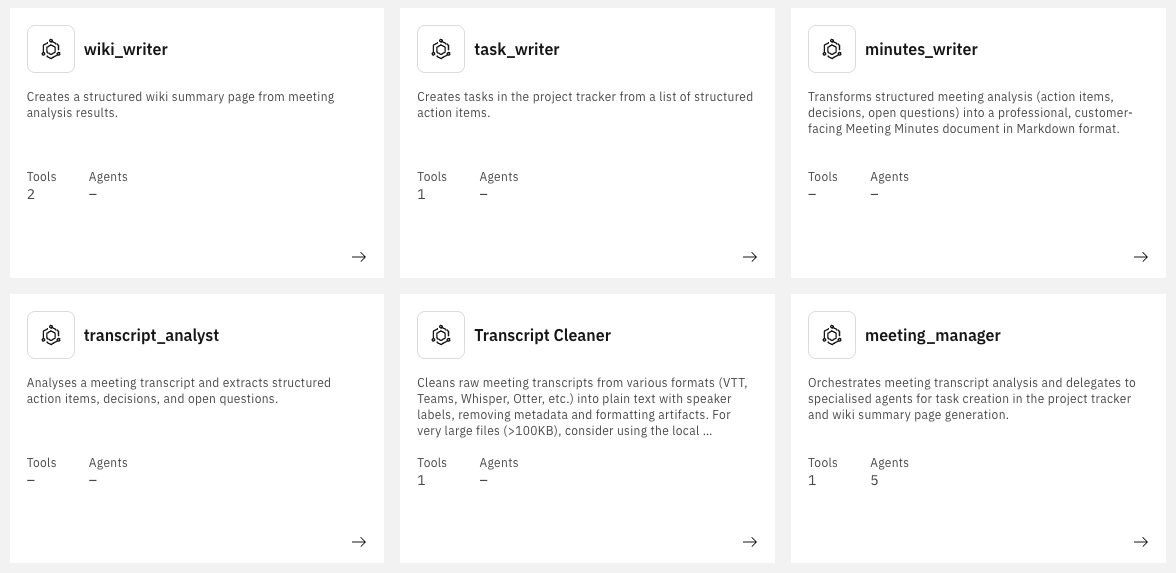
All agents are created in YAML and tools in Python.
The central agent is meeting_manager. It does not have a graph – just natural‑language instructions on how to call the other agents. This is how an agent definition looks like:
 1spec_version: v1
 2kind: native
 3style: react
 4name: meeting_manager
 5llm: groq/openai/gpt-oss-120b
 6instructions: |-
 7  **Role**
 8  You orchestrate end-to-end meeting processing with five specialist agents.
 9
10  **CRITICAL: Input Handling**
11  - Transcript is expected in the first user message.
12  - Do not ask for it twice.
13  - If missing, ask once for: transcript + project_key.
14
15  **How to route to other agents**
16  1. **transcript_cleaner**: clean raw transcript (VTT/plain text) first.
17  2. **transcript_analyst**: extract action_items, decisions, open_questions.
18  3. **minutes_writer**: generate customer-facing markdown minutes.
19  4. **task_writer**: create one task per action item using project_key.
20  5. **wiki_writer**: create summary page when wiki params are provided.
21
22  **Orchestration flow**
23  - Optional Step 0: create_project for new-project requests.
24  - Step 1: transcript_cleaner
25  - Step 2: transcript_analyst
26  - Step 3: minutes_writer
27  - Step 4: task_writer
28  - Step 5: wiki_writer (if wiki params exist)
29  - Step 6: Compile the final answer for the user.
30
31  If no wiki parameters are provided, skip Step 5.
32
33  **Project creation**
34  - For "create new project" requests, call create_project first.
35  - Required fields: name + URL-safe identifier.
36  - Use returned project ID for task_writer.
37
38  **What the user will provide (in their first message)**
39  - Meeting transcript (VTT/plain text)
40  - Project identifier
41  - Optional: wiki space key + parent page ID
42  - Optional: assignee mapping
43
44  **Processing workflow**
45  - Once transcript + project_key exist, run Steps 1-6 automatically.
46  - Stop only on agent/tool errors.
47
48  **Final answer format**
49  1. Short meeting summary
50  2. Numbered task list
51  3. Key decisions
52  4. Wiki link (if created)
53  5. Open questions
54  6. Full customer-facing meeting minutes (Markdown)
55
56collaborators:
57  - transcript_cleaner
58  - transcript_analyst
59  - minutes_writer
60  - task_writer
61  - wiki_writer
62tools:
63  - create_project
This feels surprisingly pleasant: you basically write a process description in natural language, and the orchestrator takes care of calling the right agents in the right order. This is a core philosophy of Orchestrate: you describe the process, not the wiring. The agent then decides through reasoning at runtime which agent to call based on the instructions and the current context. All subsequent agents were created in a similar way, with a mix of instructions and tool calls.
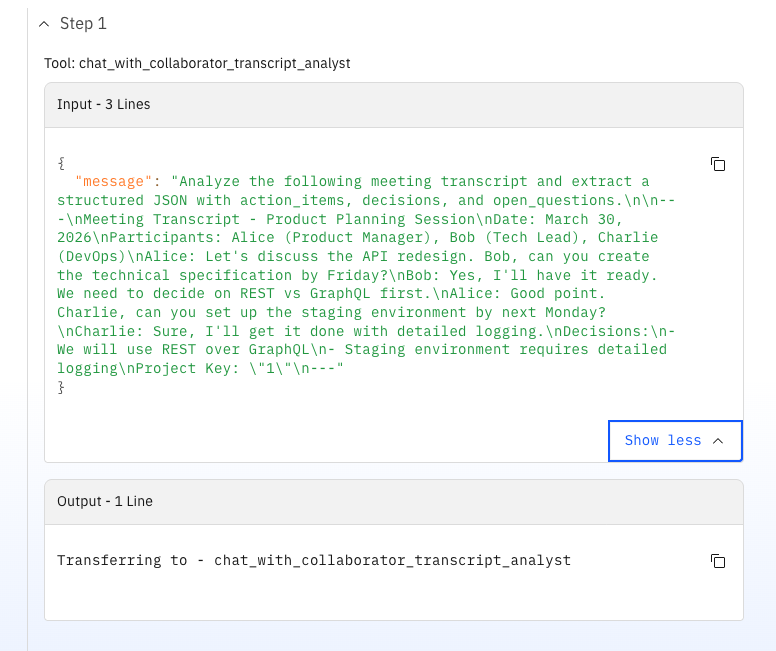
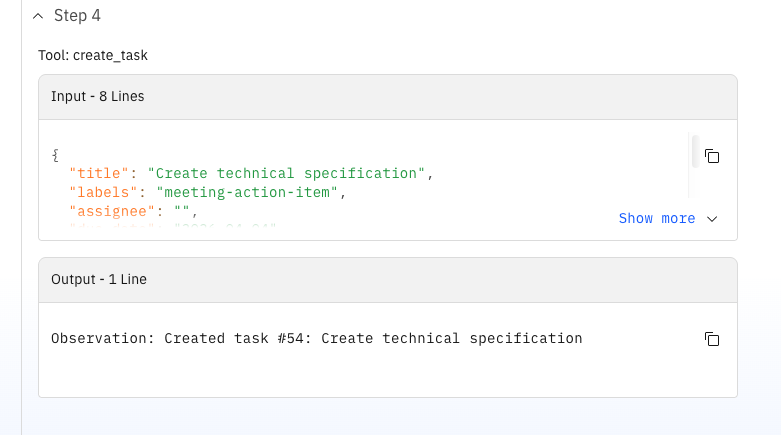
A strong point in this variant is the OpenProject integration quality (because I could design and build the tool by myself). The task tool resolves users by login/name and assigns them as real OpenProject assignees (not just text in a description). It also maps semantic priorities to OpenProject priority IDs.
 1# meeting-action-agent/tools/task_tools.py
 2
 3def _lookup_user_id(base_url, api_token, username):
 4    resp = requests.get(f"{base_url}/api/v3/users", auth=("apikey", api_token))
 5    data = resp.json()
 6    for user in data.get("_embedded", {}).get("elements", []):
 7        if user.get("login", "").lower() == username.lower() or \
 8           user.get("name", "").lower() == username.lower():
 9            return user.get("id")
10    return None
11
12def _get_priority_id(priority_text):
13    priority_map = {"low": 7, "normal": 8, "high": 9, "immediate": 10}
14    return priority_map.get(priority_text.lower(), 8)
15
16# in create_task(...)
17if assignee:
18    user_id = _lookup_user_id(base, api_token, assignee)
19    if user_id:
20        payload["_links"]["assignee"] = {"href": f"/api/v3/users/{user_id}"}
21
22payload["_links"]["priority"] = {"href": f"/api/v3/priorities/{_get_priority_id(priority)}"}
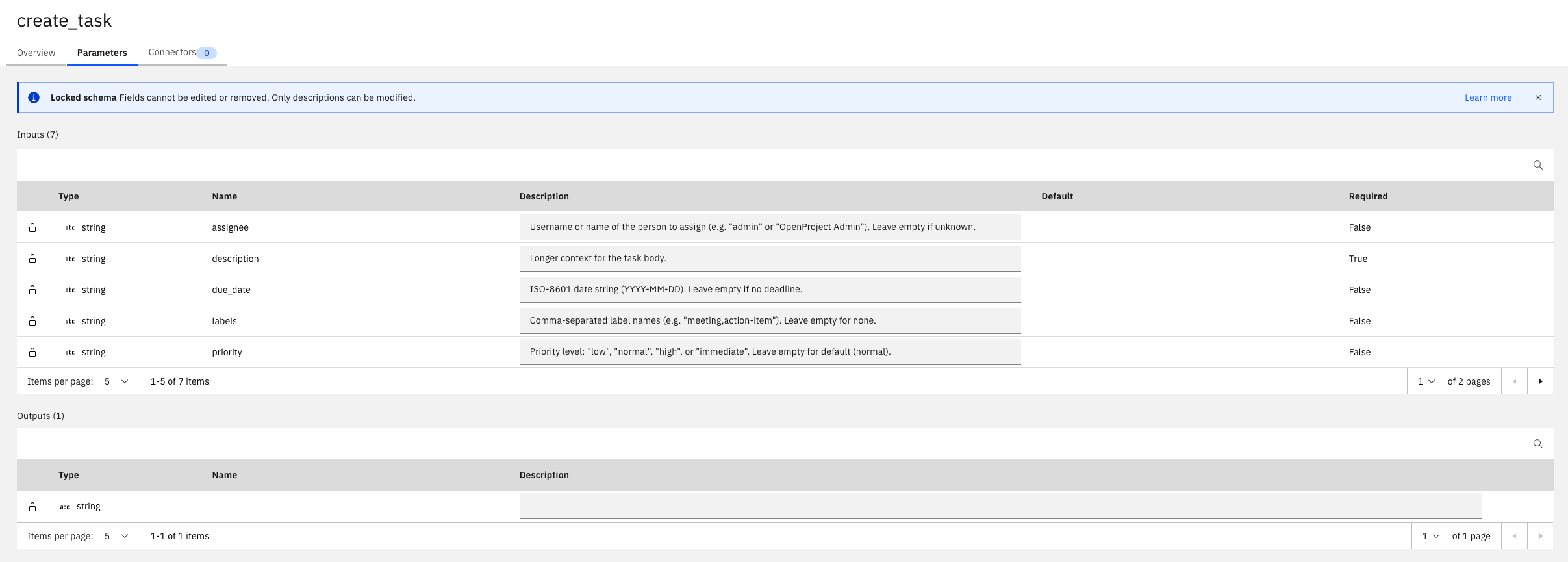
As elegant as the orchestrator looks, there were some limitations:
process-vtt.sh script that pre‑cleans the file and shrinks it to ~31 KB (~65% reduction).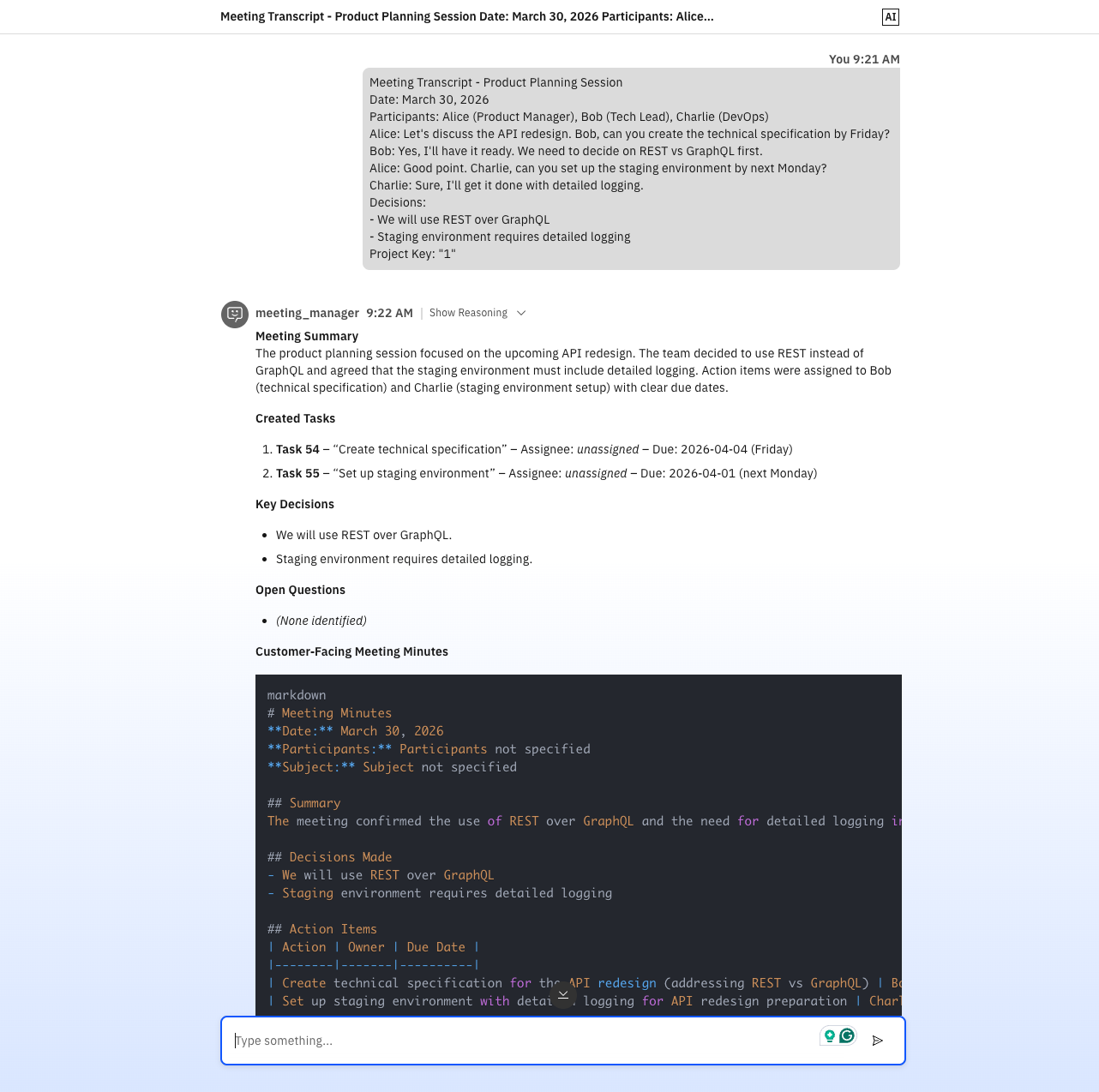
The agentic model itself was powerful and pleasant to author. The chat interface always shows the reasoning steps of the agent, as can be seen in the screenshots above. But the operational reality required a disciplined script layer and strict prompt fencing to keep runs reproducible. This workflow came together with Copilot in VS Code, but actual deployment and testing still felt tied to the Orchestrate UI and CLI commands. The introduction of IBM's coding agent "Bob" for developing tools and agents in the ADK sounds promising, because it is trained on Orchestrate's documentation and can generate code that fits the platform's requirements. However, at the time of this experiment, I did not have access to it.
The n8n world looks very different – and not just architecturally.
Unlike wxO, which has its own server, its own UI and its own CLI toolchain, n8n is just a Docker container. There is no activation ceremony, no mandatory API key subscription, no Python virtual environment to juggle. You docker run it, open localhost and you're in. You can build workflows in the web UI, but you can also design them as JSON files and deploy them via the REST API.
The n8n side of this experiment ended up with:
meeting-action-workflow.json with 22 nodes, mcp-meeting-tool.json as MCP wrapper)deploy.sh, test-workflow.sh)n8n-mcpOf course, n8n was designed to be a simple no- or low-code workflow builder. However, due to the rapid iteration cycles and agentic capabilities being used everywhere, clicking through the UI sounds nice and easy, but it quickly becomes a bottleneck. You have to find the right node, open it, edit JSON in a textarea, save, test, repeat. For a complex workflow like the one I had in mind, this would be rather slow. So the most interesting constraint I set for myself on the n8n side was: build and operate everything from VS Code, without touching the n8n web interface.
That is possible via n8n-mcp – an MCP server that wraps the n8n REST API into ~21 MCP tools and makes them available directly in the editor through the Copilot agent. What that looked like in practice:
n8n_create_workflow MCP tooln8n_executionsn8n_update_partial_workflowtest-workflow.shThe patching step was the one that surprised me most. Instead of clicking through the UI to find and fix a node, I could describe the change to Copilot in plain language, have it generate the correct partial-update payload and deploy the fix – in seconds. For tight iteration loops, this felt faster than a browser-based workflow editor.
The deploy.sh script supports both a direct REST API mode and a --mcp flag for MCP-driven deployment. test-workflow.sh takes a transcript file and a project key as arguments, JSON-encodes the content via python3, and POSTs it to the webhook endpoint:
1./test-workflow.sh ../../meeting-action-agent/example-transcript.txt 1
In parallel, the mcp-meeting-tool.json workflow exposes the entire meeting flow as an MCP server trigger, so external agents (including wxO itself, in theory) can call it as a tool.
The full flow has 22 nodes. Simplified, the pipeline is:
Webhook Trigger
├── Transcript Cleaner (code node, regex)
├── Transcript Analyst (LLM chain, llama3.2:latest)
├── Parse Analysis JSON (code node)
├── Resolve Project Info (code node)
├── IF: Has Project Key
│   ├── [yes] Inject Project Key
│   └── [no]  Search Project by Name
│             ├── [found]     Inject Project Key
│             └── [not found] Create New Project
│                             └── Set New Project Key
│                                 └── Inject Project Key
├── Create Task (HTTP → OpenProject)
├── Aggregate Created Tasks
├── Merge Analysis + Tasks (code node)
├── Minutes Writer (LLM chain, gemma4:31b)
├── Strip Reasoning Noise (code node)
├── Wiki Placeholder (code node)
└── Respond to Webhook
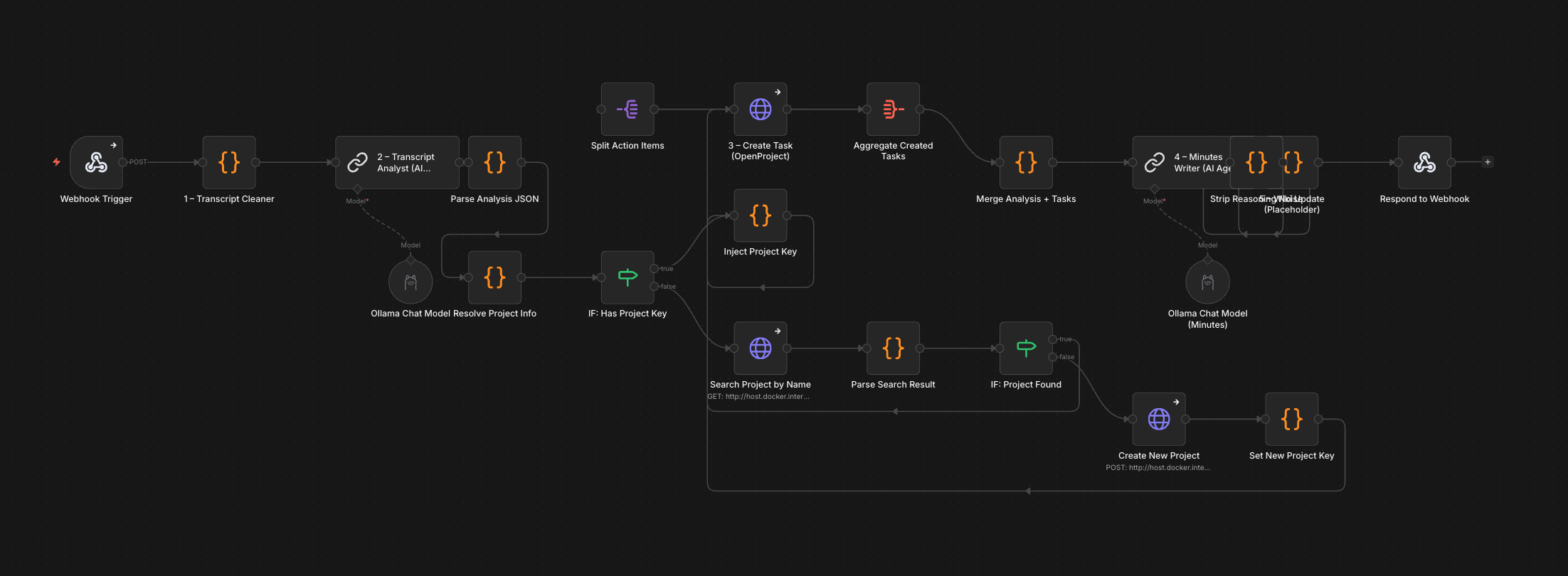
The project auto-resolution branch (7 nodes) is probably the most n8n-idiomatic part of the whole workflow: something that wxO handles through LLM reasoning at runtime is here expressed as an explicit decision graph. More verbose, but also more predictable and debuggable.
With local models, "return only JSON" is more of a polite suggestion than a guarantee. gemma4:31b occasionally produces extended reasoning before the JSON, llama3.2 occasionally outputs two JSON objects back-to-back. That meant the parser node had to be genuinely robust:
 1// Extract first complete top-level JSON object via brace-counting
 2function extractFirstJson(s) {
 3  const start = s.indexOf('{');
 4  if (start === -1) return null;
 5  let depth = 0, inStr = false, escape = false;
 6  for (let i = start; i < s.length; i++) {
 7    const c = s[i];
 8    if (escape) { escape = false; continue; }
 9    if (c === '\\' && inStr) { escape = true; continue; }
10    if (c === '"') { inStr = !inStr; continue; }
11    if (inStr) continue;
12    if (c === '{') depth++;
13    else if (c === '}') { depth--; if (depth === 0) return s.slice(start, i + 1); }
14  }
15  return null;
16}
17
18const stripped = aiResponse
19  .replace(/```(?:json)?|```/g, '')
20  .replace(/["'`]+$/, '')
21  .trim();
22const jsonCandidate = extractFirstJson(stripped);
Similar story for the minutes output: gemma4:31b often prefixes the minutes with chain-of-thought reasoning. So there's a dedicated "Strip Reasoning Noise" node that cuts everything before the last occurrence of "# Meeting Minutes" in the output.
1const marker = raw.lastIndexOf('# Meeting Minutes');
2const minutes = marker >= 0 ? raw.slice(marker).trim() : raw.trim();
Both of these are the kind of defensive code you don't want to write, but you end up writing when local models are involved. With a cloud LLM in JSON mode, most of this would disappear.
After publishing the workflow on the n8n UI, I was able to trigger it via the Webhook node and watch the execution in real time.
Here too, not everything was smooth:
gemma4:31b ignored JSON-only instructions for short inputs and fell back to reasoning text. llama3.2 returned empty templates or duplicate JSON objects. The fix: two different models – Llama for JSON extraction (temperature 0.1), Gemma for free-form minutes text.project_key despite includeRemainingFields: true being set. There is nothing in the UI that warns you about this. The fix was a custom "Inject Project Key" code node that manually splits the action items array and reattaches the field.gemma4:31b took 5+ minutes for longer transcripts. curl's default 60-second timeout triggered before the workflow finished. Workaround: --max-time 300, or read results from the executions API after the fact.Here's how the two variants stacked up across the five workflow stages:
On the wxO side, I originally had a dedicated LLM agent (transcript_cleaner) for this. In practice, I ended up using the external process-vtt.sh Python script instead, because large VTT files overwhelmed the agent's context window and produced loops, regardless of using Orchestrate's recommended provided models or larger local models. So the "agentic" cleaning step became a pre-processing script outside the platform to manage context size and ensure stability.
In n8n, transcript cleaning is a JavaScript code node inside the workflow – pure regex, no LLM, no external step. Feed it raw VTT or plain text, and it strips timestamps, tags, and duplicates deterministically. Transcript cleaning is a deterministic task. Using an LLM for it added cost and instability without adding value.
This is where the LLM choice matters more than the platform.
wxO ran transcript_analyst on a cloud model (GPT-OSS via Groq). The JSON output was stable and structured – I didn't need parser workarounds.
n8n ran llama3.2:latest locally via Ollama. The model mostly worked, but required a JSON parser, markdown stripping, and fallback logic for duplicate outputs. This was the single most time-consuming piece of debugging in the entire experiment, but it is a cloud-vs-local LLM difference, not a platform difference. If I had pointed n8n at the same cloud model with JSON mode enabled, the parser hacks would likely be unnecessary.
The wxO variant has a Python tool for this: it looks up users by login or display name, sets a real _links.assignee reference (not just text in a description field), maps strings like "high" to the correct OpenProject priority ID, and handles the URL differences between Docker container networking and the host. Because I created it specifically for this setup, it handles the details a generic HTTP node won't.
The n8n variant uses an HTTP Request node that POSTs to the OpenProject API. It creates work packages and sets subjects, descriptions and due dates correctly. But it writes assignee names into the description text rather than linking them as OpenProject users, and priorities were hardcoded to "normal". The richer tool integration is a direct result of having full Python at your disposal, where you can write helper functions, error handling and API lookup logic naturally. In n8n, you'd add more HTTP Request nodes and code nodes to match that – doable, but more verbose.
Both sides produce usable Markdown meeting minutes. The difference is in cleanup effort.
wxO's minutes_writer agent on a cloud LLM produces clean Markdown directly – no post-processing needed.
n8n's Minutes Writer on gemma4:31b (local) produces good text, but frequently prefixes it with chain-of-thought reasoning. The Strip Reasoning Noise code node cuts everything before the last # Meeting Minutes marker. It works, but it's the kind of band-aid you shouldn't need. Both produce minutes I'd send to a stakeholder. n8n needs an extra cleanup node, but the output quality is comparable.
wxO deployment means: activate venv, set env vars, start Orchestrate server (takes a while), import agents one by one or via import-agents.sh, then test by pasting transcripts into the chat UI. It works, but it's a multi-step ceremony that's hard to fully script end-to-end.
n8n deployment from this experiment: design JSON, deploy via MCP tool from VS Code, test with ./test-workflow.sh transcript.txt 1, inspect failures via executions API, patch nodes via partial update – all without leaving the editor. The entire lifecycle is scriptable, version-controllable, and CI/CD-friendly. The MCP integration turns n8n into a programmable backend you control from your IDE. For teams that think in Git, pull requests and infrastructure-as-code, this fits naturally.
This isn't a win/lose comparison, it's a trade-off to be aware of:
The wxO approach scales well when you add new capabilities (just add another agent and mention it in the orchestrator-agent instructions). The n8n approach scales well when you need reliability and auditability (every execution path is traceable in the graph).
Three things surprised me most:
How productive the MCP-driven n8n workflow felt. I genuinely built the entire 22-node workflow from VS Code: initial deployment, debugging, patching individual nodes, re-testing – all through MCP tools and shell scripts. At almost no point did I open the n8n web interface. For a developer team already living in VS Code, this is a remarkably natural way to build workflow automations.
How well the wxO orchestrator actually routes.
The meeting_manager always picked the right agents in the right order. The orchestration instructions read like a process description you'd put in a wiki – and yet under the hood, you're dispatching to real tools, real APIs, real external systems. When it works, it feels elegant.
Where the real debugging hours went. Not into wxO. Not into n8n. Into the local LLMs. JSON format stability, reasoning noise leaking into structured outputs, timeout management when inference takes longer than expected. The platforms themselves were rarely the bottleneck – the models were. This was one of the biggest time sinks and the least satisfying parts of the experiment.
After this experiment, here's how I'd draw the line:
Reaches its full potential when ...
In that world, n8n with MCP becomes a powerful sovereign AI hub – especially when combined with local LLM serving, LangChain nodes and a GitOps mindset.
Reaches its full potential when ...
Here, wxO works as an agent control plane that can sit on top of many backend systems – which could themselves be powered by tools like n8n.
The two aren't mutually exclusive. You could use wxO as the conversational front-end and orchestration layer, calling n8n workflows as backend tools via MCP or webhooks. That's an architecture worth exploring.
This experiment was never about finding a winner. The real question was: how does each platform feel when you run it against something real? And yes, I know I cannot simply generalize from one use case, one set of models, one workflow design. But I do think this kind of hands-on, side-by-side building is the best way to understand the trade-offs in practice.
After running both sides for real, here's where I landed:
watsonx Orchestrate is compelling when agents are an enterprise capability – something that needs to slot into existing processes, respect governance boundaries, and integrate deeply with tools like assignee resolution, wiki pages or corporate knowledge systems. The natural-language orchestration model is genuinely powerful, and with a strong cloud LLM, the routing "just works" most of the time.
n8n + MCP is compelling when agents and LLMs are a developer tool – something you build from your IDE, version in Git, deploy via scripts, and debug by reading execution logs. The deterministic graph model trades elegance for predictability, and the MCP integration makes n8n feel less like a separate platform and more like a programmable layer in your existing stack.
If you want to run a comparison like this in your own environment – whether with n8n, watsonx Orchestrate, local LLMs, OpenProject, or a completely different stack – feel free to reach out. This is the kind of hands-on work we do at Infralovers.
Leverage AI tools to enhance coding efficiency, automate repetitive tasks, and unlock innovative development workflows.
Use AI-powered skills, workflow automation, and enterprise-grade governance to imprive efficiency of your team.
Build powerful automated workflows with N8N and connect your enterprise stack, integrate AI capabilities, and deploy self-hosted automation.
What does a driverless elevator have to do with the question of who still gets to become a senior in the age of AI? The first driverless elevator ran around
I wanted to find out whether our internal, VPN-only systems could be made usable from Claude, with real identity, and without the connection turning into a
Two weeks ago I wrote about what changes when you keep the model fixed and swap the harness. The short version: the wrapper matters more than people assume.
A web agency takes its clients from idea to finished website along the same path it used twenty years ago: a briefing becomes a concept, the concept becomes a
I ran the same coding task through four AI coding tools this week - opencode, Pi, GitHub Copilot in VS Code, and Claude Code - all driven by the same local
You are interested in our courses or you simply have a question that needs answering? You can contact us at anytime! We will do our best to answer all your questions.
Contact us